 By Mark
 Google Trend is a data analysis tool provided by Google that visually represents changes in search volume for specific keywords over time. Users can filter data by time period, region, language, and more to analyze trends effectively.
Key Features
- Search Volume Analysis – Track when and how often a keyword has been searched.
- Regional Interest Analysis – Compare search volume by country and city.
- Related Keywords & Topics – Discover similar keywords and trending searches.
- Compare Keywords – Analyze trends by comparing up to five keywords.
- Real-Time Search Trends – View current trending searches in real time.
Use Cases
- Marketing & SEO – Identify trending keywords to create content and advertising strategies.
- Market Research – Analyze the popularity of products and services to understand consumer interest.
Google Trend : https://trends.google.com/trending?geo=US&hl=en
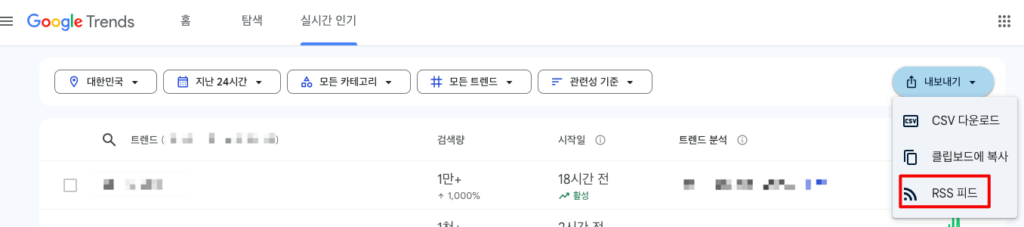
RSS Feed
Python pip
pip install feedparserGet Trend Data
# pip install feedparser

import datetime
import sys
import os
import feedparser

sys.path.append(os.path.dirname(os.path.abspath(os.path.dirname(__file__))))
# SSL certificate verification stays at the default (enabled).


def get_trend(national):
    feed = feedparser.parse('https://trends.google.co.kr/trending/rss?geo=' + national)
    indexs = ['title', 'ht_approx_traffic', 'ht_news_item_title', 'published']
    head_message = f'[Google Trend - {national}]\n'

    today = datetime.date.today()
    yesterday = datetime.date.today() - datetime.timedelta(days=1)
    today_day_of_week = today.strftime("%a")
    today_day = today.strftime("%d")
    yesterday_day_of_week = yesterday.strftime("%a")
    yesterday_day = yesterday.strftime("%d")
    message = ''

    for item in feed.entries:
        try:
            for index in indexs:
                print(f'{index}: {getattr(item, index)}')
        except:
            continue
        tmp = str(item.published).replace(",", "")
        tmp_time = tmp.split(" ")

        if (len(item.ht_approx_traffic) > 6) and ((today_day_of_week == tmp_time[0] and today_day == tmp_time[1]) or (
                yesterday_day_of_week == tmp_time[0] and yesterday_day == tmp_time[1])):
            message += f"  {item.title} ({item.ht_approx_traffic}) - {str(item.ht_news_item_title).replace(''', '').replace('"', '')}\n"
        else:
            continue
    return str(head_message + message)


if __name__ == "__main__":
    #print("Google Trend plugin Create!")
    nationals = ['KR', 'US', 'GB', 'JP', 'HK', 'IN', 'TW']

    for national in nationals:
        print(f"Google Trend {national} data get")
        print(get_trend(national))
Code walkthrough
For each country code (KR, US, GB, JP, HK, IN, TW), the script reads the Google Trends trending-searches RSS feed and returns one string containing only the high-traffic items published yesterday or today.
- Read the feed:
feedparser.parse()gets the URL with?geo=<country>appended. The code uses thetrends.google.co.krdomain for every country. - Print the fields: for each entry it prints
title,ht_approx_traffic(approximate search volume),ht_news_item_title(related news headline) andpublished. The “Output” sample below is this print, taken before filtering, which is why it includes items with only 100+ searches. - Compare dates: it splits
publishedinto weekday and day-of-month and compares them with today and yesterday. Month and year are not compared. - Filter by traffic: only items whose
ht_approx_trafficstring is longer than 6 characters (for example100000+) go into the final message. It filters by string length instead of parsing the number.
About SSL verification: the original code disabled certificate checks with ssl._create_unverified_context. I removed it because it makes the connection open to interception. If a corporate network or proxy causes certificate errors, point Python at that environment’s CA certificates instead of turning verification off.
Output Main Code
Google Trend KR data get
title: lg ai
ht_approx_traffic: 100+
ht_news_item_title: LG to take on OpenAI, DeepSeek with Korea first reasoning AI model
published: . . . . . . . . .
. . .

title: 勝利
ht_approx_traffic: 100+
ht_news_item_title: 選抜高校野球、柳ヶ浦・杉本は初のエースナンバーで手応え…二松学舎大付に敗れるも「通用するとわかった」
published: . . . . . . . . .
While Google Trend primarily focuses on collecting and analyzing user search data, its potential applications go far beyond tracking search volume.
For example, businesses can use Google Trend to detect shifts in consumer interest, helping them refine marketing strategies or determine the best timing for new product launches. Media outlets and research organizations can analyze keyword search patterns to predict social trends, economic shifts, and political developments.
In this sense, Google Trend is more than just a search data analysis tool—it serves as a valuable resource for forecasting and strategic planning.
In the future, I plan to write a blog post on how to analyze and summarize sentences effectively.